
Onsite Computer Repair in Northridge: Same-Day Service for Homes and Offices
Computer problems never wait for a convenient time. A sudden system crash can halt a busy remote workday, while a failing office network can bring business operations to a complete standstill. At Mobile Computer Repair, we provide certified onsite computer repair throughout Northridge and the surrounding San Fernando Valley communities. Our mobile technicians travel directly to your […]
Back to School: How to Speed Up Your Kid’s Laptop Before the School Year Gets Busy

As the school year ramps up, the last thing your child needs is a slow, glitchy laptop. First of all, a sluggish computer holds them back from completing assignments. In addition, it disrupts live video classes and wastes precious study time. Worse, it creates massive academic frustration. At Mobile Computer Repair, meanwhile, we offer fast, affordable laptop tune-ups for students throughout the Los Angeles area. In […]
Understanding Windows 11: Should You Upgrade and Is Your PC Compatible?
Windows 11 brings a sleeker interface, improved security, and significantly better overall performance — but not every PC can run it. Before you upgrade, you need to be aware of Windows 11 upgrade compatibility to know if your hardware qualifies and what to expect from the transition. For most users, double-checking Windows 11 upgrade compatibility […]
SSDs, HDDs, NAS, or Cloud Storage? Where to Save Your Files
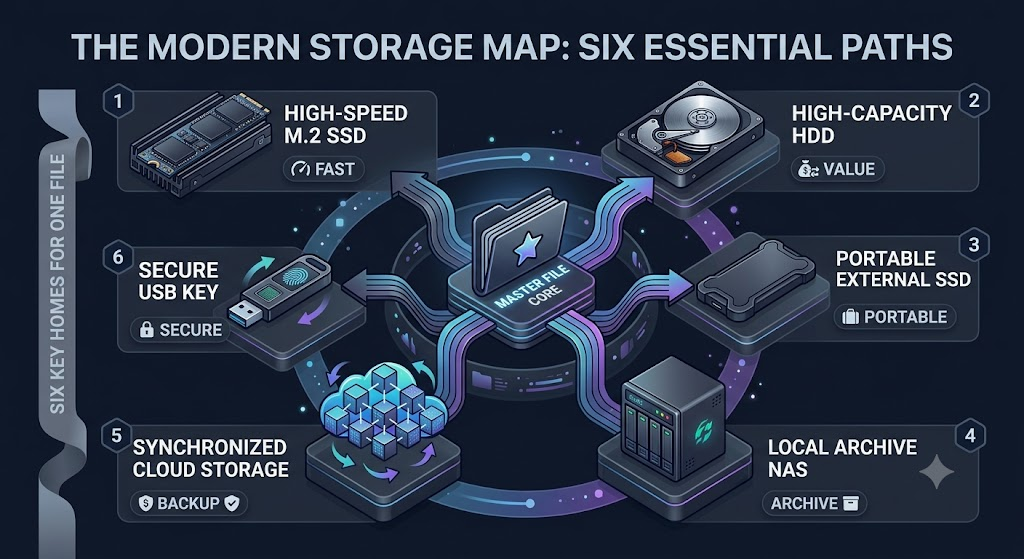
The honest answer to which storage option is best is that it completely depends on what kind of file you are trying to save, how often you need it, and whether you are working with a team or solo. And last but not least, how much you’d cry if it disappeared tomorrow. Even picking one […]
Blue Screen of Death: What It Means and How to Fix It
Few computer problems are as frustrating and alarming as the infamous Windows crash screen known as the Blue Screen of Death. If you have ever been working on an important project, watching a video, or simply browsing the internet when your computer suddenly freezes and displays a blue screen filled with error messages, you […]
DIY vs Professional Repair: When to Call the Experts
When your computer breaks down, the first question is simple:Should you try a do-it-yourself fix—or call for professional help? In many cases, Los Angeles users attempt DIY repairs to save money. However, not every issue is safe to handle alone. In fact, some problems can get worse without expert service. Therefore, this guide will help […]
Hard Drive Crashed? Here’s What Happens Next

A hard drive crash can feel like a nightmare—especially when critical files suddenly become inaccessible. Whether it’s business documents, client records, or personal data, a storage crash can happen without warning. However, the good news is that data recovery is often possible. More importantly, understanding what happens next can help you act quickly and improve […]
Computer Performance Optimization in Los Angeles

If your system feels sluggish, unresponsive, or constantly lagging, professional computer performance optimization in Los Angeles can restore speed without unnecessary hardware replacement. Slow computers are one of the most common technology frustrations for both homeowners and businesses. While many assume ageing hardware is the problem, performance issues often stem from software conflicts, background processes, […]
Computer Running Slow? 5 Things We Check First

Is your once-lightning-fast machine now sluggish and constantly lagging? Whether you’re working from home in Santa Monica or running a business in Downtown LA, a slow computer is more than just an annoyance—it’s a major hit to your productivity. At our slow computer repair Los Angeles center, we see hundreds of devices with performance issues […]
How Long Does Computer Repair Actually Take in LA?
If you’ve ever frantically Googled “how long does computer repair take in Los Angeles,” you’re not alone. A common question for anyone needing tech help is, just how long does a standard computer repair take in LA? Whether it’s a busted screen, a dead battery, or a mysterious startup issue, knowing how long you’ll be […]